
Sitemap
A list of all the posts and pages found on the site. For you robots out there is an XML version available for digesting as well.
Pages
Data Retention Policies
Published in Policies, 2024
Establish clear policies for how long data should be retained based on regulatory requirements and business needs.
My Master Data Management Reference Architecture
Published in Master Data, 2024
Leverage Business Capability Maps for Data Domains
Data Strategy and architecture in practice
Published:
Please Read Carefully
Published:
Solve technical problems, increase efficiency and productivity, and improve systems </a> </h2> </article> </div>Posts
Hello PyTorch
Published:
The objective is to use the very basic example of linear regression and use PyTorch to build a model to demonstrate Pytorch workflow and its fundementals.
SpaceTitanic Pipeline - Model Impute - 81 score
Published:
The objective in this Notebook is to use a Pipeline to streamline development of code. I will not be focusing on data analysis and charts.
Machine Learning for daily tasks
Published:
I was tasked with planning demand for tickets for a complex Application Maintenance System that supports multiple companies. There was some historical data available, and it was invaluable. Using machine learning with sklearn, we were able to predict ticket volumes on a monthly basis with a very high degree of accuracy. Going through the usecase
Blog Post number 3
Published:
This is a sample blog post. Lorem ipsum I can’t remember the rest of lorem ipsum and don’t have an internet connection right now. Testing testing testing this blog post. Blog posts are cool.
portfolio
What is it that we want from our data architecture
This is the dream: We strive for a unified and usable data and analytic platform
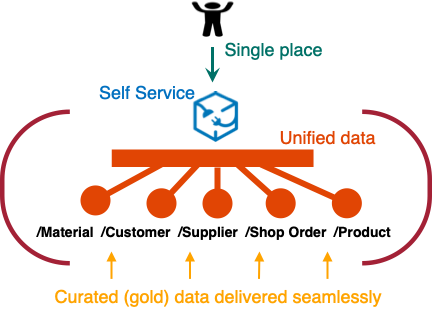
What is unified data
A single, coherent, and consistent view of the data across the organization
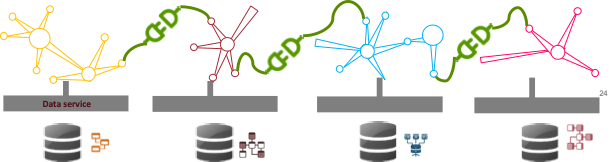
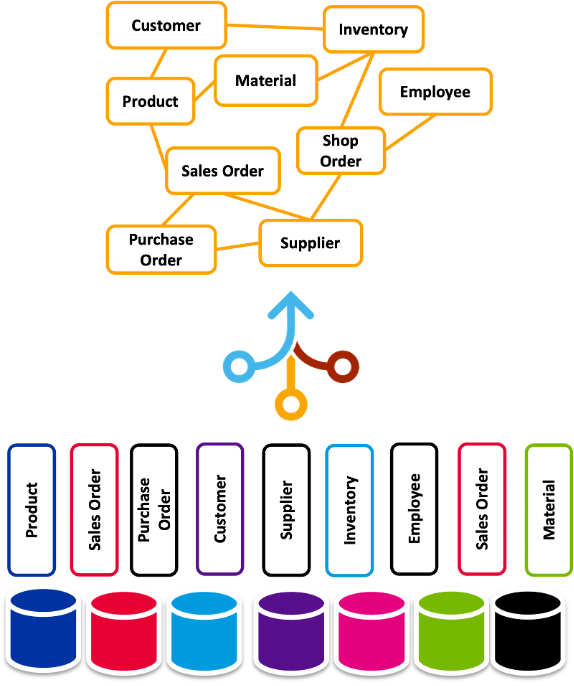
Integrated Data
Combining data from different sources and providing a unified view
What is usable data
We need data to have an acceptable quality, readily available and easily accessible.

Data Governance
We want the data to be usable. How do we ensure it?
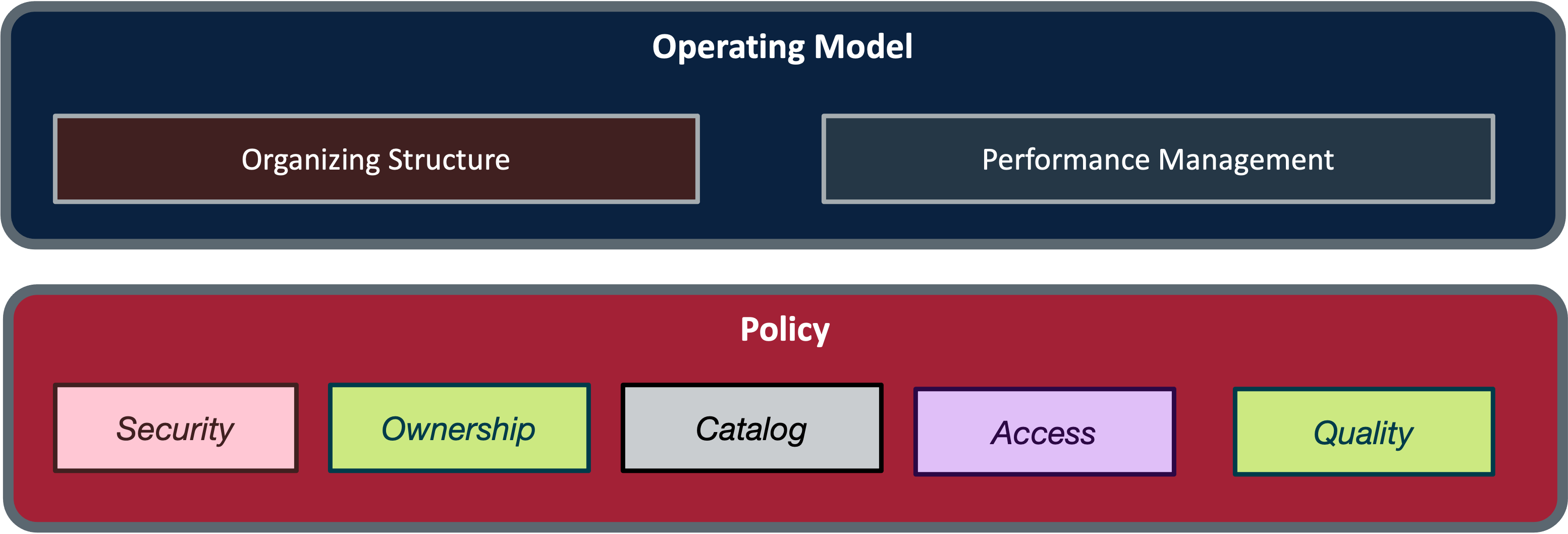
Data Management
Making Data Useful and Integrated:

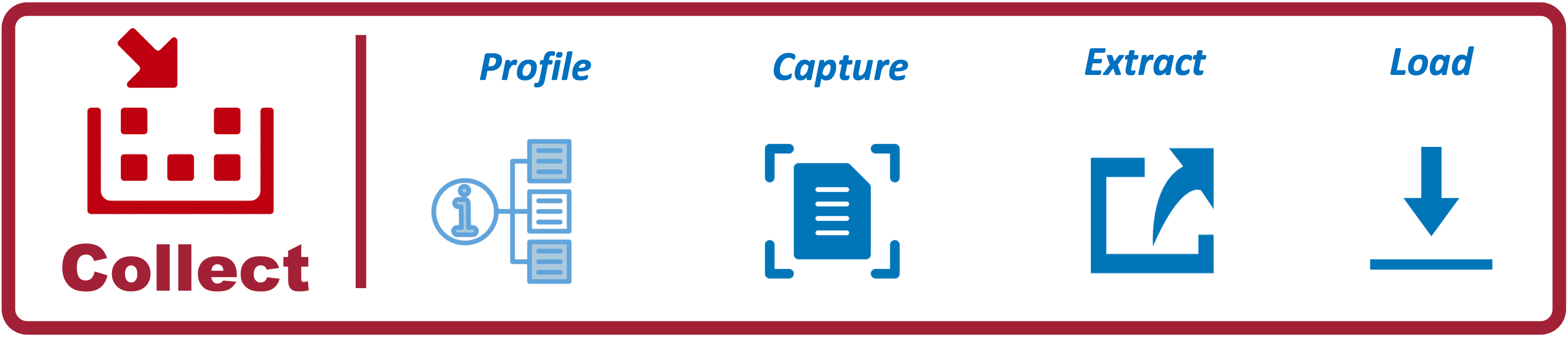
Collect Architecture
Collect the data for analytics:
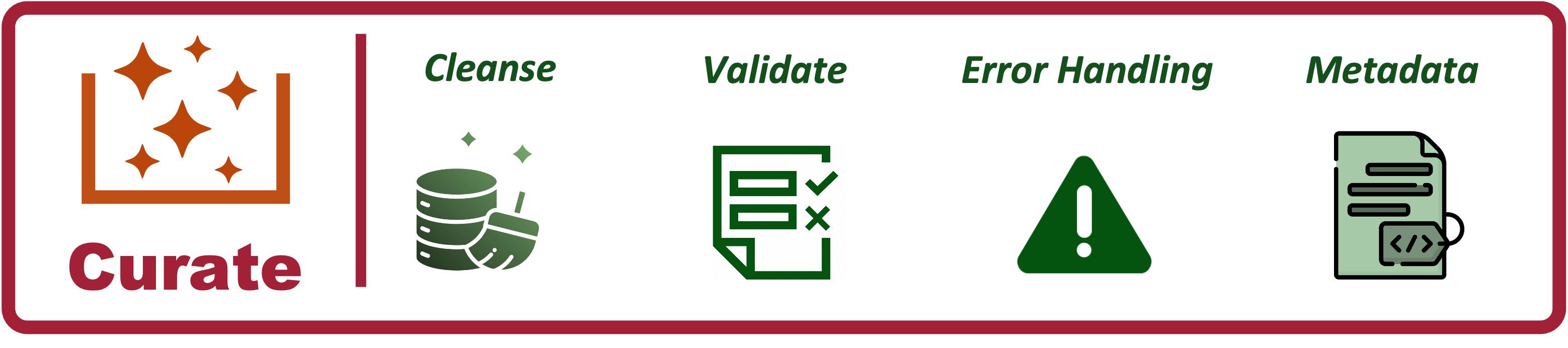
Curate Architecture
Curate the data for analytics:
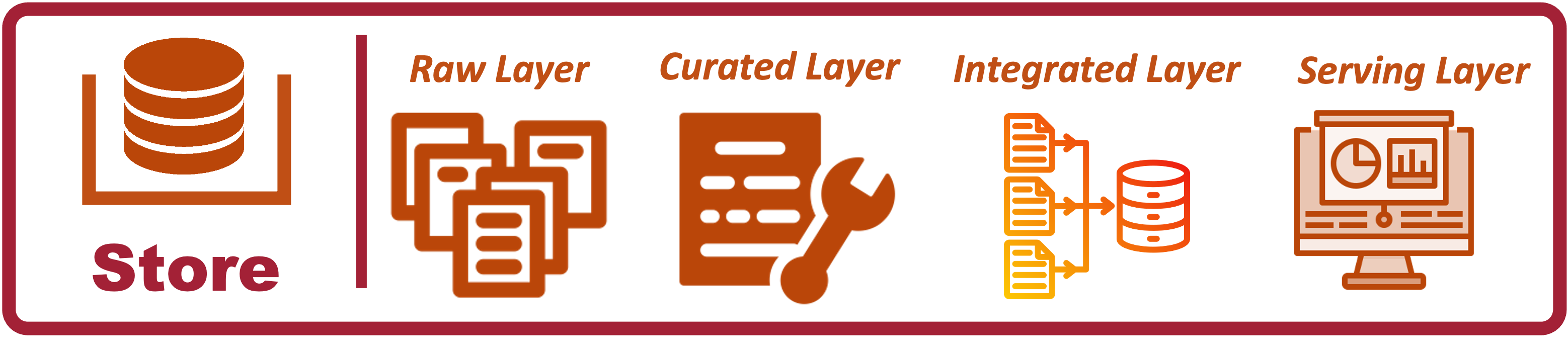
Storage Architecture
Storage for Data Analytics: Coming Soon
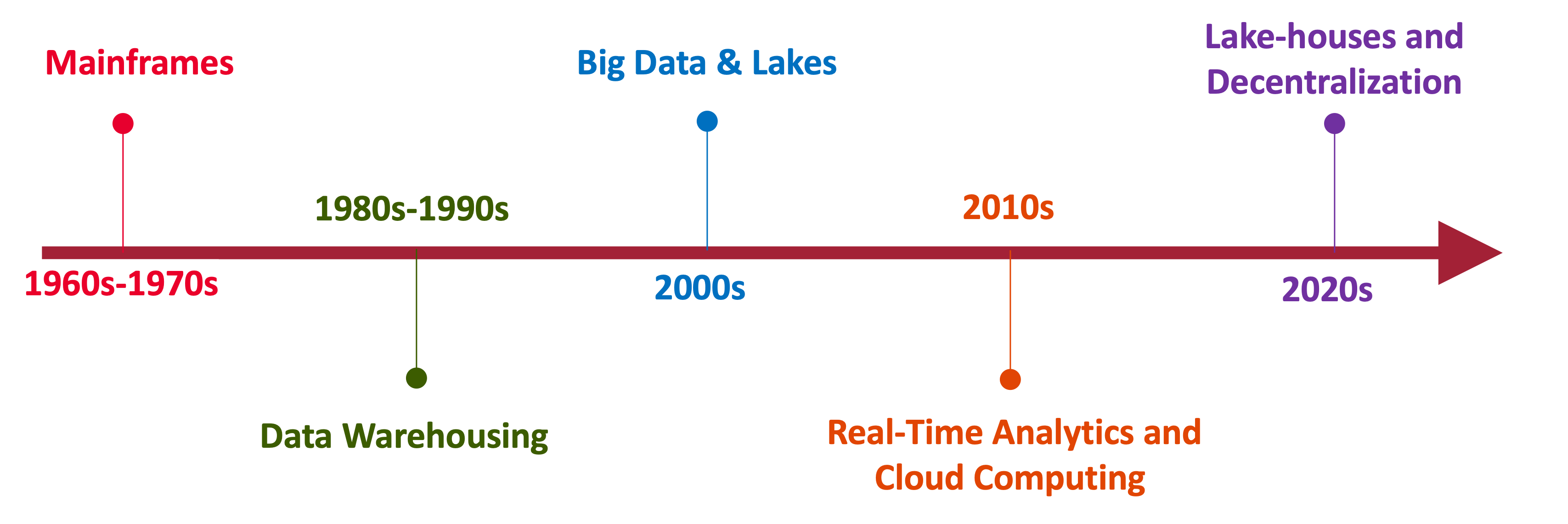
Data Analytics Architectures
A Brief History
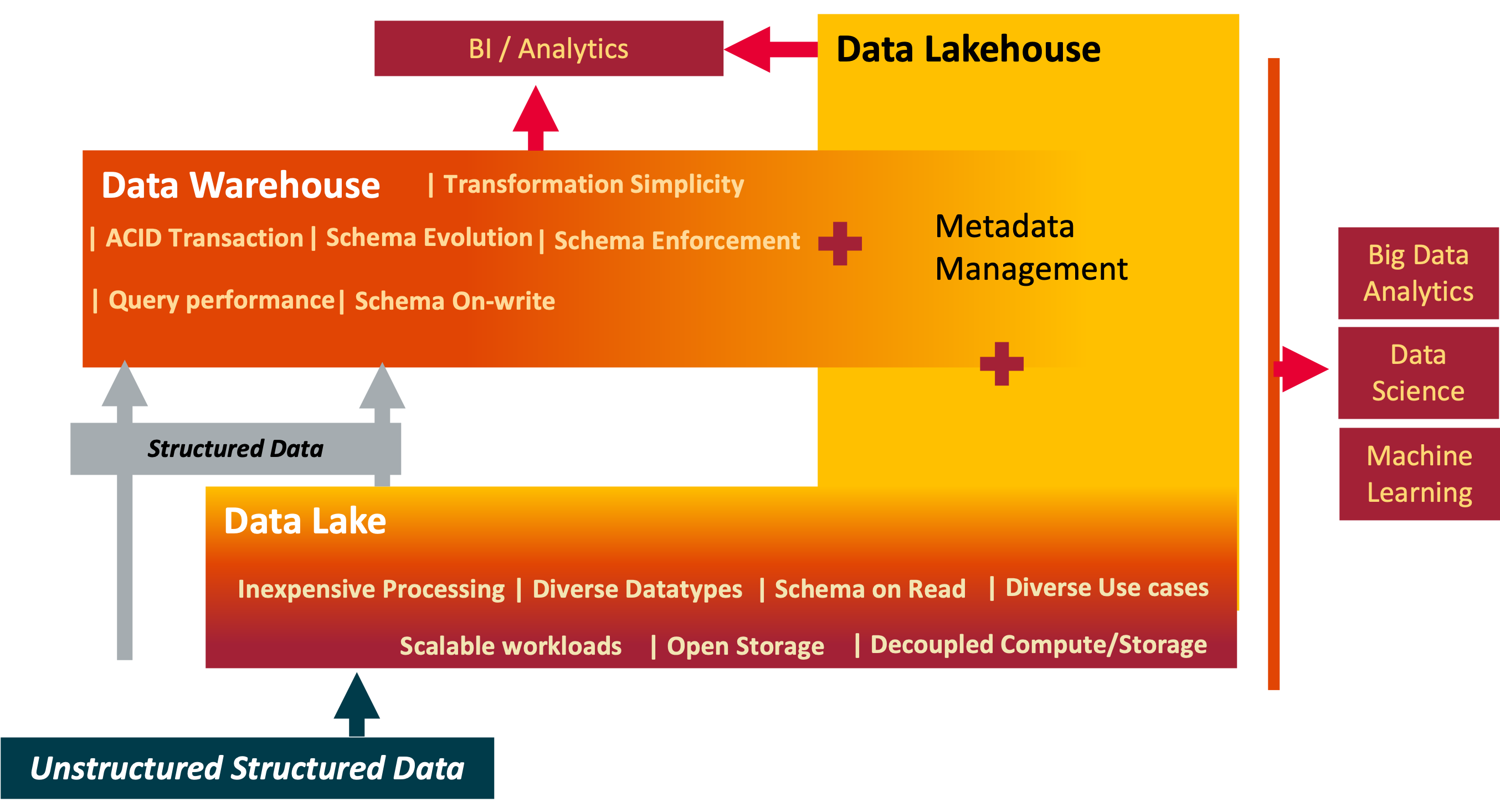
Data: Warehouse, Lake and Lakehouse
Yesterday, Today and Tomorrow of Data Processing
Data Fabric simply explained
Published:
What? Enterprise wide consisted data management design. Why? Reduce the time to deliver data integration and interoperability How? Through metadata.
Data Analytics Storage in 2024
Storage is foundational. The choices are simplified by the maturing technolgies. Providing a technical overview

Unified Enterprise Data Model
One Model to rule them all
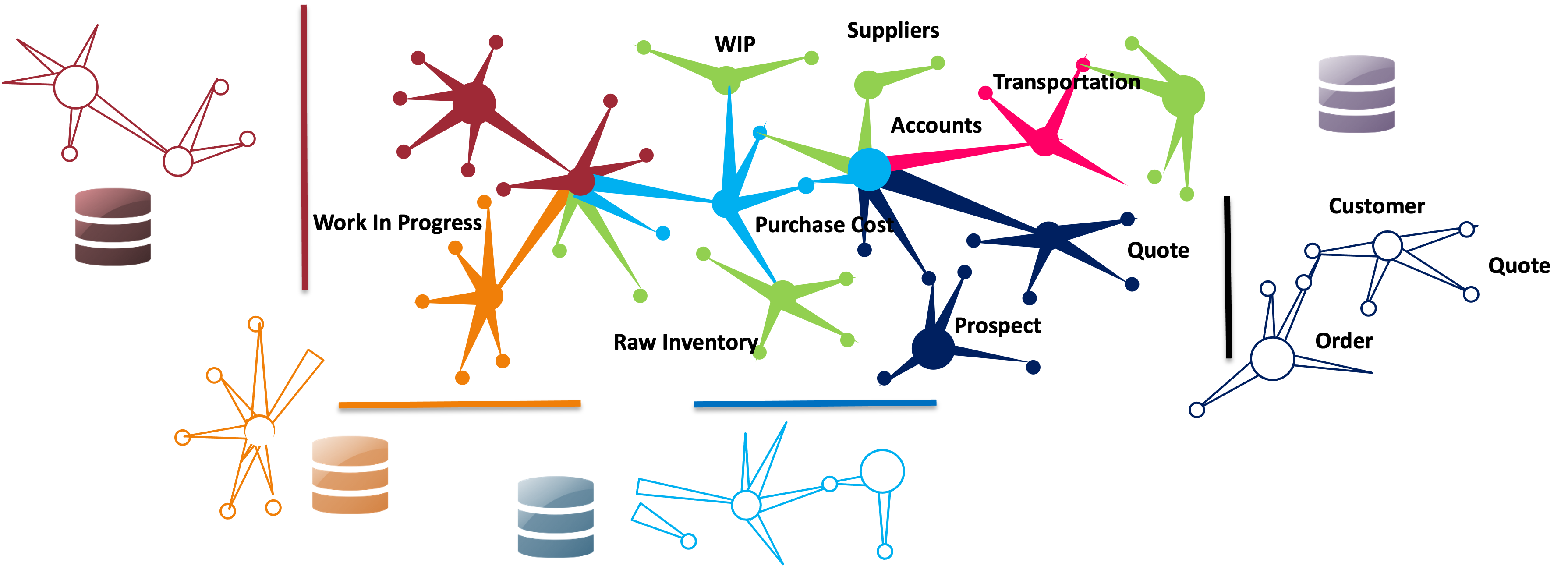
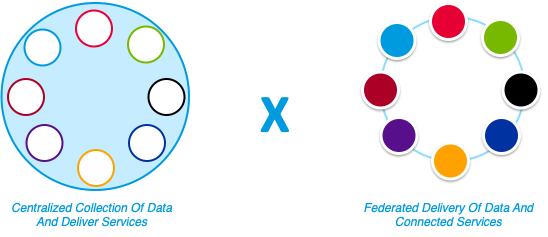
Centralized Vs Federated
Published:
Coming Soon
Example of a data architecture policy
A more effective format that is both simple and truly serves the intent of a policy

publications
Collect - Extraction: Batch Transfer
Published in Processing, 2024
Batch Transfer: One of the most common scenarios of extraction. For now atleast
Collect - Extraction: Transfer Compressed Data
Published in Processing, 2024
Move Compresssed data
Collect - Extract and Load Patterns
Published in Processing, 2024
Transfer data from source to taget
Collect: Pre-ingest vs Post-ingest Processing
Published in Processing, 2024
I do not tend to draw hard lines between applying processing logic directly on the source system before extracting the data or performing transformations post-ingestion in an analytics platform. Both approaches are valid, depending on factors such as data volume, complexity, real-time requirements, and system architecture. However, most modern data scale needs require processing to be done post-ingestion.
Collect: Data Profiling
Published in Processing, 2024
Data profiling is essential for understanding the quality, structure, and consistency of data
Curate: Data Cleansing
Published in Processing, 2024
Deliver quality data
Data Products: Adopting Microservice Architecture Principles
Published in Product, 2024
By applying microservice principles, data products can be designed to be modular, scalable, and maintainable, providing greater flexibility and agility in data-driven environments
Data Platform - Enteprise Semantic Layer Requirements
Published in Data Platform, 2024
Deliver Data as an Organized, Unified and Consistent Product
Data Store: Raw Layer
Published in Processing, 2024
Keep the Raw Layer “Raw”
Collect: Data Capture
Published in Processing, 2024
Capture data from source system for processing in an Analytics System
Federated Data Management through Domain-Oriented Decentralized Data Ownership
Published in , 1900
Leverage Business Capability Maps for Data Domains
MDM Patterns. All are relevant and can coexist
Published in Master Data, 2024
Leverage Business Capability Maps for Data Domains
Measure Data Architecture
Published in Governance, 2024
Consistency on what we measure and how we measure data domains. An method with an example scenario
talks
Data Engineering Project Initiation Checklist
Published:
Some upfront work is required to ensure the success of data engineering projects. I have used this checklist to provide a framework for collaborating with multiple stakeholders to define clear requirements and designs.
Snowflake Implementation Notes
Published:
Virtual Warehouses
Cloud Storage: Best practices
Published:
- Buckets names: I am split on wheter to have have smart names which clear inform about the intent of the bucket and its files and the security concerns that may arise by doing so. If there is a need to hide the intent of buckets from possible attackers, we would need manage and enforce catalogs. However, I have seen the worst of both worlds in which the naming is gives enough and these buckets not being cataloged. I would recommend a naming coventions or rules to catalog bucket names and have audits to ensure compliance.
Parquet: Best practices demonstration
Published:
A often overlooked feature of Parquet is its support for Interoperability which is key to enterprise data plaforms which serves different tools and systems, facilitating data exchange and integration. This is my take on Parquet best practices and I have used python-pyarrow to demonstrate them.
Table Formats Comparison Demo
Published:

Avro vs Parquet vs CSV Demo
Published:

Column Transformations for Staging
Published:

ConversationAI: Importing Documents
Published:

teaching
Iceberg Setup with Spark ETL and Nessie Catalog - Part 2
Lakehouse, Iceberg, Spark, 2024
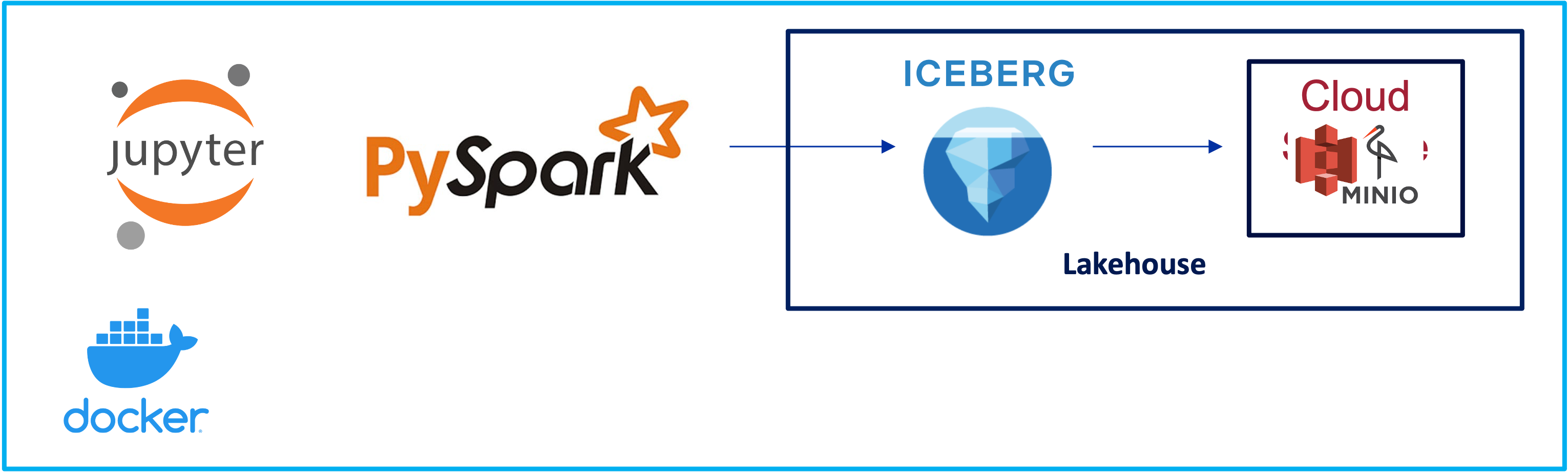
Iceberg Setup with Spark ETL and Nessie Catalog - Part 1
Lakehouse, Iceberg, Spark, 2024
MinIO Object Storage for Linux Locally (anywhere)
Lakehouse, Minio, 2024
When I play with new technologies, I like to plat it on my machine locally. Minio is a perfect simulation of cloud storage locally. You can deploy it locally and interact it like a S3 object storage.
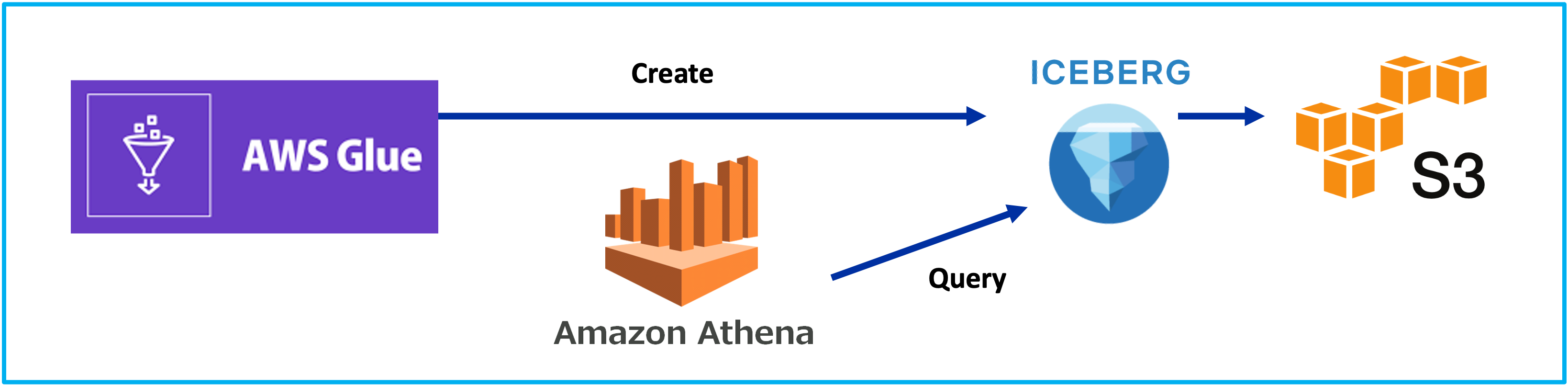
Iceberg on AWS: Part 2 - Glue 4 Loves Iceberg
Lakehouse, Glue, 2024
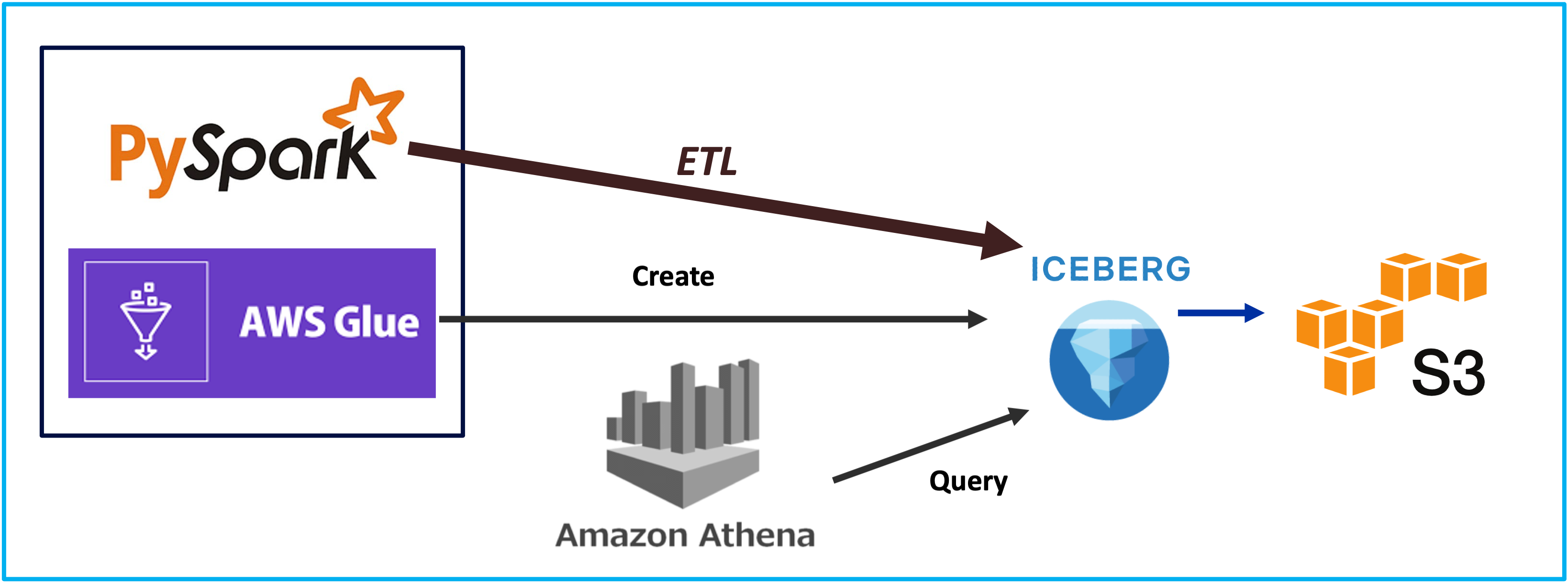
Iceberg on AWS: Part 1 - Hello World
Lakehouse, Iceberg, 2024
Local Development: AWS Lambda deployed in Docker with DynamoDB in NoSQLWorkbench
Application Service, AWS, 2024
Install DynamoDB locally
The installables can be found at the aws wbesite:https://docs.aws.amazon.com/amazondynamodb/latest/developerguide/DynamoDBLocal.DownloadingAndRunning.html
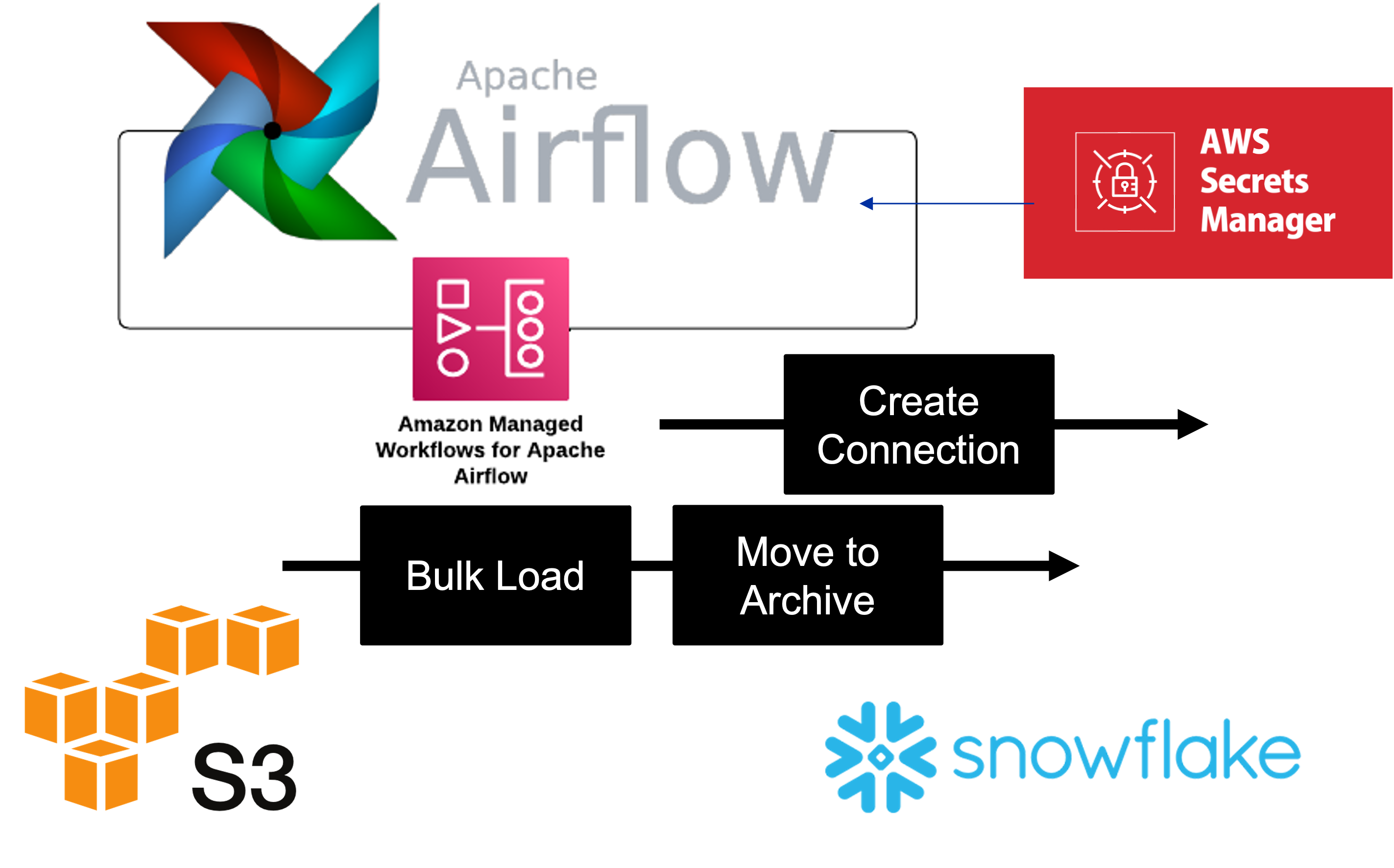
Apache Airflow: AWS Managed (MWAA) - Snowflake
Lakehouse, Airflow, 2024
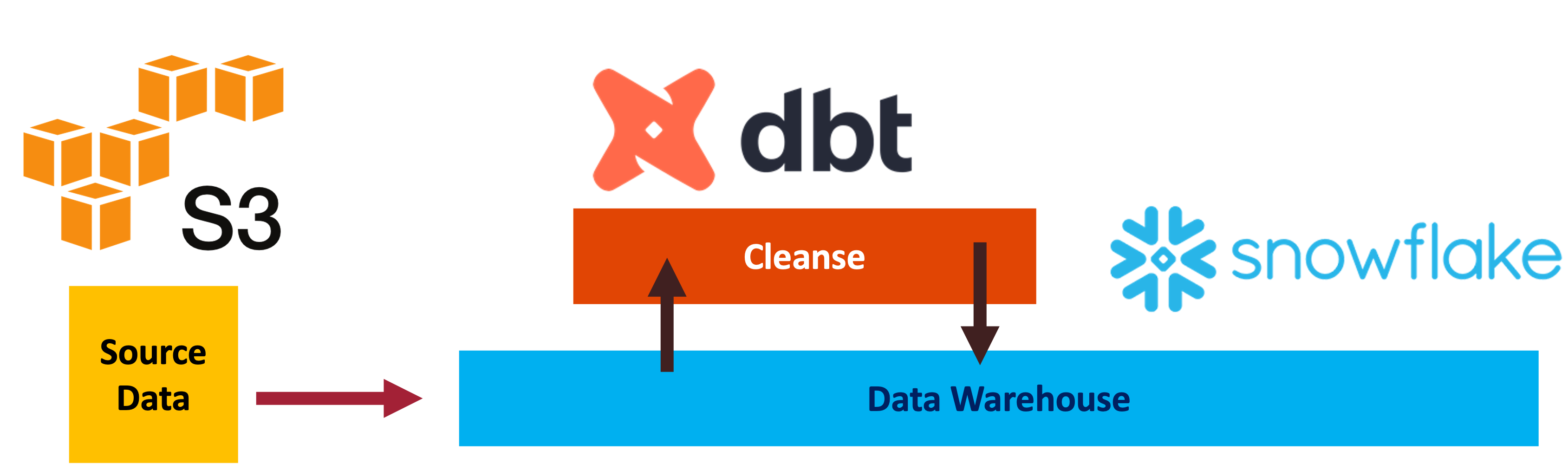
Data Processing with DBT and Snowflake
Data Warehouse, Snowflake, 2024
ETL Data Test and Validate
Data Warehouse, Snowflake, 2024
Setup
Installed DBT Core locally. The install configuration can be described by the command: dbt debug 
Installed DBT Utils 

DataFlow: Source Storage, Transform and Sink Biquery
Data Processing, GCP, 2024

Manage Data Quality With Great Expectations
Data Quality, Snowflake, 2024
Apache Beam Model. Clean and Simple
Data Processing, Beam, 2024

Apache Beam Using Pardo in DataFlow
Data Processing, Beam, 2024

Hive on EMR Serverless
DataLake, Glue, 2024

Infrastructure as Code - Terraform for Azure
Infrastructure, Azure, 2024

Collect: Airbyte Extract And Load to both S3 and Snowflake
Lakehouse, Airflow, 2024

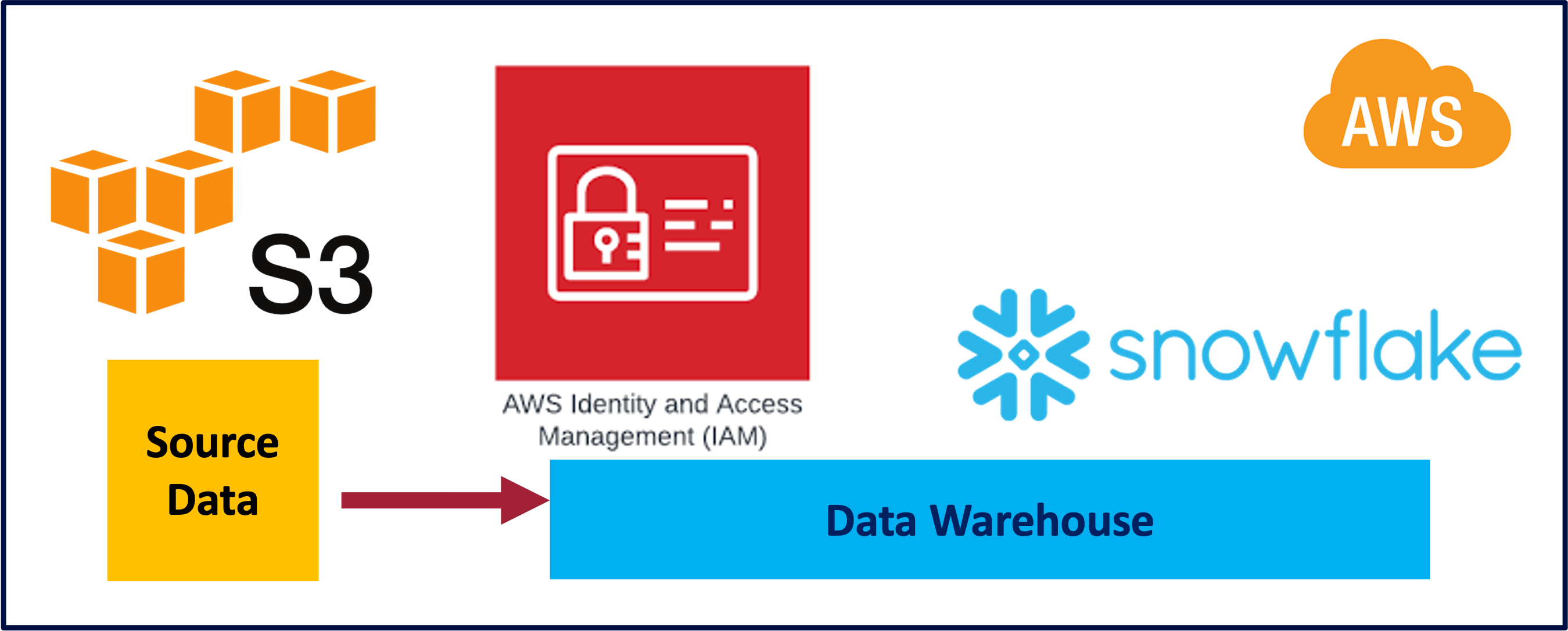
Snowflake: AWS S3 Loading
Datawarehouse, S3, 2024
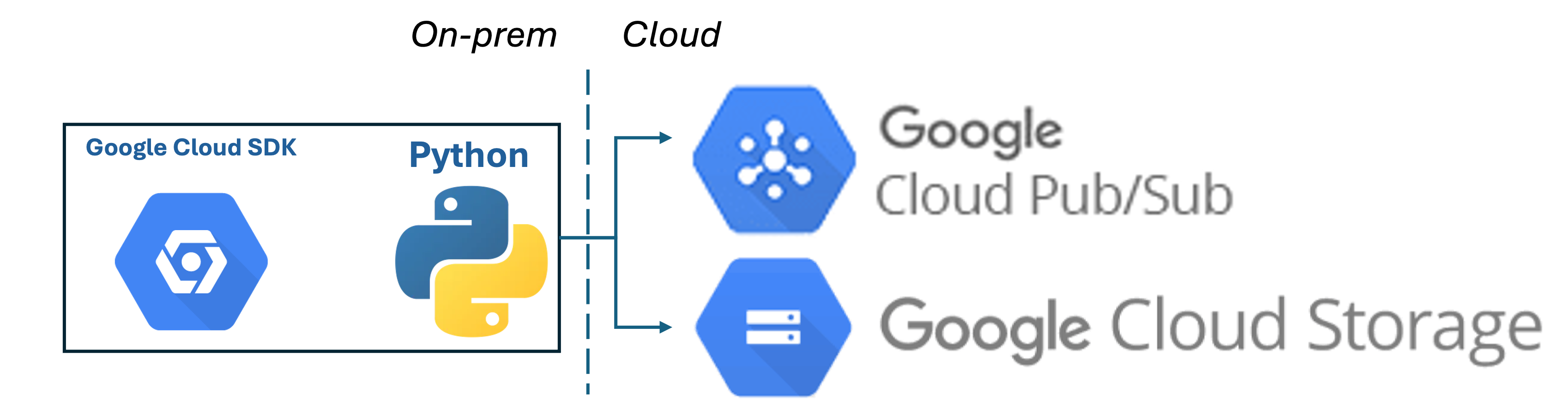
On-Prem gcloud SDK - Cloud Storage & Pub/Sub
gcloudSDK, GCP, 2024
Building Reliability in On-prem Data Upload Jobs Through Log Monitoring
Monitoring, GCP, 2024

GCP DialogFlowCX: Setup, Flow, Intent, Entities and Parameters
AI/ML, DialogflowCX, 2024

GCP DialogFlowCX Data store LLM generated agent responses based Knowledgebase in Storage.
AI/ML, DialogflowCX, 2024

AWS Lake Formation.
Data Lake, LakeFormation, 2025
AWS Lake Formation = Scaled Data Lake + Scaled Security Provisioning 
Snowflake: AWS S3 Loading 22222222222
Datawarehouse, S3, 2026
I had used the Template SQL Worksheet provided by Snowflake with an end to end process to load data from Amazon S3 which I play around with. It worked like a champ. Also used the Snowflake documentation.
Setup
/*--

Helpful Snowflake Documentation:
        1. Bulk Loading from Amazon S3 - https://docs.snowflake.com/en/user-guide/data-load-s3
        2. https://docs.snowflake.com/en/sql-reference/functions/system_validate_storage_integration
-*/
-------------------------------------------------------------------------------------------
    -- Step 1: To start, let's set the Role and Warehouse context
        -- USE ROLE: https://docs.snowflake.com/en/sql-reference/sql/use-role
        -- USE WAREHOUSE: https://docs.snowflake.com/en/sql-reference/sql/use-warehouse
-------------------------------------------------------------------------------------------

--> To run a single query, place your cursor in the query editor and select the Run button (⌘-Return).
--> To run the entire worksheet, select 'Run All' from the dropdown next to the Run button (⌘-Shift-Return).

---> set Role Context
USE ROLE accountadmin;

---> set Warehouse Context
USE WAREHOUSE compute_wh;
-------------------------------------------------------------------------------------------
    -- Step 2: Create Database
        -- CREATE DATABASE: https://docs.snowflake.com/en/sql-reference/sql/create-database
-------------------------------------------------------------------------------------------
---> create the Database
CREATE  OR REPLACE  DATABASE  db_prestage;
-------------------------------------------------------------------------------------------
    -- Step 3: Create Schema
        -- CREATE SCHEMA: https://docs.snowflake.com/en/sql-reference/sql/create-schema
-------------------------------------------------------------------------------------------
---> create the Schema
CREATE SCHEMA IF NOT EXISTS db_prestage.ERP
   COMMENT = 'Loading data from S3' ;
-------------------------------------------------------------------------------------------
    -- Step 4: Create Table
        -- CREATE TABLE: https://docs.snowflake.com/en/sql-reference/sql/create-table
-------------------------------------------------------------------------------------------
---> create the Table
CREATE  TABLE  IF NOT EXISTS  db_prestage.ERP.business_partners
    (
   PARTNERID INTEGER,
    PARTNERROLE INTEGER,
    EMAILADDRESS varchar,
    PHONENUMBER INTEGER,
    FAXNUMBER varchar,
    WEBADDRESS varchar,
    ADDRESSID INTEGER,
    COMPANYNAME varchar,
    LEGALFORM varchar,
    CREATEDBY INTEGER,
    CREATEDAT INTEGER,
    CHANGEDBY INTEGER,
    CHANGEDAT INTEGER,
    CURRENCY varchar
    --> supported types: https://docs.snowflake.com/en/sql-reference/intro-summary-data-types.html
    )
    COMMENT = 'Creating a table';

---> query the empty Table
SELECT * FROM db_prestage.ERP.business_partners;
Follow the instructions which was strainght forward. This was the IAM JSON policy which I had created and worked for me.
    "Version": "2012-10-17",
    "Statement": [
        {
            "Effect": "Allow",
            "Action": [
                "s3:PutObject",
                "s3:GetObject",
                "s3:GetObjectVersion",
                "s3:DeleteObject",
                "s3:DeleteObjectVersion"
            ],
            "Resource": "arn:aws:s3:::com-kfn-landing-s3storage-play-erp/erp/*"
        },
        {
            "Effect": "Allow",
            "Action": [
                "s3:ListBucket",
                "s3:GetBucketLocation"
            ],
            "Resource": "arn:aws:s3:::com-kfn-landing-s3storage-play-erp",
            "Condition": {
                "StringLike": {
                    "s3:prefix": [
                        "erp/*"
                    ]
                }
            }
        }
    ]
}
Create a Snowflake Integration
-------------------------------------------------------------------------------------------
    -- Step 5: Create Storage Integrations
        -- CREATE STORAGE INTEGRATION: https://docs.snowflake.com/en/sql-reference/sql/create-storage-integration
-------------------------------------------------------------------------------------------

    /*--
      A Storage Integration is a Snowflake object that stores a generated identity and access management
      (IAM) entity for your external cloud storage, along with an optional set of allowed or blocked storage locations
      (Amazon S3, Google Cloud Storage, or Microsoft Azure).
    --*/

---> Create the Amazon S3 Storage Integration
    -- Configuring a Snowflake Storage Integration to Access Amazon S3: https://docs.snowflake.com/en/user-guide/data-load-s3-config-storage-integration

CREATE  OR REPLACE STORAGE INTEGRATION kfn_s3_integration
  TYPE = EXTERNAL_STAGE
  STORAGE_PROVIDER = 'S3'
  STORAGE_AWS_ROLE_ARN = 'arn:aws:iam::573981122510:role/SnowflakeS3ReadRole'
  ENABLED = TRUE
  STORAGE_ALLOWED_LOCATIONS = ('s3://com-kfn-landing-s3storage-play-erp/erp/' )
 ;

    /*--
      Execute the command below to retrieve the ARN and External ID for the AWS IAM user that was created automatically for your Snowflake account.
      You’ll use these values to configure permissions for Snowflake in your AWS Management Console:
          https://docs.snowflake.com/en/user-guide/data-load-s3-config-storage-integration#step-5-grant-the-iam-user-permissions-to-access-bucket-objects
    --*/

DESCRIBE INTEGRATION kfn_s3_integration;

SHOW STORAGE INTEGRATIONS;

upload data into the bucket

Create a stage
-------------------------------------------------------------------------------------------
    -- Step 6: Create Stage Objects
-------------------------------------------------------------------------------------------

    /*--
      A stage specifies where data files are stored (i.e. "staged") so that the data in the files
      can be loaded into a table.
    --*/

---> Create the Amazon S3 Stage
    -- Creating an S3 Stage: https://docs.snowflake.com/en/user-guide/data-load-s3-create-stage

create stage kfn_s3_stage
 storage_integration = kfn_s3_integration
 url = 's3://com-kfn-landing-s3storage-play-erp/erp/'
 ;

---> View our Stages
    -- SHOW STAGES: https://docs.snowflake.com/en/sql-reference/sql/show-stages

list @kfn_s3_stage;

Load Data
-------------------------------------------------------------------------------------------
    -- Step 7: Load Data from Stages
-------------------------------------------------------------------------------------------

---> Load data from the Amazon S3 Stage into the Table
    -- Copying Data from an S3 Stage: https://docs.snowflake.com/en/user-guide/data-load-s3-copy
    -- COPY INTO <table>: https://docs.snowflake.com/en/sql-reference/sql/copy-into-table

COPY INTO db_prestage.ERP.business_partners
  FROM @kfn_s3_stage
    FILES = ( 'BusinessPartners.csv' )
 file_format = (type = csv skip_header = 1 field_delimiter = ',');

-------------------------------------------------------------------------------------------
    -- Step 8: Start querying your Data!
-------------------------------------------------------------------------------------------

---> Great job! You just successfully loaded data from your cloud provider into a Snowflake table
---> through an external stage. You can now start querying or analyzing the data.

SELECT * FROM db_prestage.ERP.business_partners;

Collect: Palantir: Ingest simple DB via UI
Palantir, Palantir, 2026
The objective is to build a fundemental ingest building block for ingest “Data Connection” in Palantir.
Some Prep work.
We need to host a DB (Postgres) and supabase.com to the rescue. I had used github cred to create a free account and load data into it.
loading the data into the table
Providing the sql statements to explain the data
-- Sample PLM database schema and seed data
-- Use case: Product lifecycle management with products, versions, components, change requests, and approvals.

-- Drop tables if they exist (adjust syntax for your RDBMS if needed)
DROP TABLE IF EXISTS approval_steps;
DROP TABLE IF EXISTS change_requests;
DROP TABLE IF EXISTS product_components;
DROP TABLE IF EXISTS product_versions;
DROP TABLE IF EXISTS products;

-- Product master table
CREATE TABLE products (
    product_id INT PRIMARY KEY,
    product_code VARCHAR(20) NOT NULL,
    product_name VARCHAR(100) NOT NULL,
    product_family VARCHAR(50),
    lifecycle_stage VARCHAR(30) NOT NULL,
    created_at DATE NOT NULL
);

-- Product version table representing released revisions
CREATE TABLE product_versions (
    version_id INT PRIMARY KEY,
    product_id INT NOT NULL,
    version_label VARCHAR(20) NOT NULL,
    release_date DATE,
    status VARCHAR(30) NOT NULL,
    description VARCHAR(200),
    FOREIGN KEY (product_id) REFERENCES products(product_id)
);

-- Product component bill of materials
CREATE TABLE product_components (
    component_id INT PRIMARY KEY,
    version_id INT NOT NULL,
    component_code VARCHAR(30) NOT NULL,
    component_name VARCHAR(100) NOT NULL,
    quantity INT NOT NULL,
    supplier VARCHAR(100),
    lifecycle_status VARCHAR(30) NOT NULL,
    FOREIGN KEY (version_id) REFERENCES product_versions(version_id)
);

-- Change request table for product/version changes
CREATE TABLE change_requests (
    request_id INT PRIMARY KEY,
    product_id INT NOT NULL,
    version_id INT,
    request_type VARCHAR(50) NOT NULL,
    request_title VARCHAR(150) NOT NULL,
    requested_by VARCHAR(100) NOT NULL,
    requested_date DATE NOT NULL,
    target_release_date DATE,
    request_status VARCHAR(30) NOT NULL,
    priority VARCHAR(20) NOT NULL,
    description TEXT,
    FOREIGN KEY (product_id) REFERENCES products(product_id),
    FOREIGN KEY (version_id) REFERENCES product_versions(version_id)
);

-- Approval workflow steps for change requests
CREATE TABLE approval_steps (
    approval_id INT PRIMARY KEY,
    request_id INT NOT NULL,
    approver VARCHAR(100) NOT NULL,
    step_order INT NOT NULL,
    approval_status VARCHAR(30) NOT NULL,
    decision_date DATE,
    comments VARCHAR(250),
    FOREIGN KEY (request_id) REFERENCES change_requests(request_id)
);

-- Seed data for products
INSERT INTO products (product_id, product_code, product_name, product_family, lifecycle_stage, created_at) VALUES
(1, 'PLM-1000', 'Smart Sensor Platform', 'IoT', 'Development', '2025-01-15'),
(2, 'PLM-2000', 'Industrial Gateway', 'Edge Systems', 'Release', '2024-08-01'),
(3, 'PLM-3000', 'Mobile App Suite', 'Software', 'Maintenance', '2023-11-20'),
(4, 'PLM-4000', 'Smart Factory Controller', 'Automation', 'Release', '2024-05-08'),
(5, 'PLM-5000', 'AR Maintenance Assistant', 'AR/VR', 'Concept', '2025-02-12');

-- Seed data for product versions
INSERT INTO product_versions (version_id, product_id, version_label, release_date, status, description) VALUES
(101, 1, 'v0.9', NULL, 'Prototype', 'Initial prototype for internal testing'),
(102, 1, 'v1.0', '2025-06-10', 'Planned', 'First commercial release planned'),
(103, 1, 'v1.1', '2025-09-30', 'Planned', 'Hardware and firmware release for next iteration'),
(201, 2, 'v1.0', '2024-11-12', 'Released', 'Initial production release'),
(202, 2, 'v1.1', '2025-03-05', 'Released', 'Minor update with stability fixes'),
(203, 2, 'v2.0', '2025-09-10', 'Planned', 'Major gateway update with new protocol support'),
(301, 3, 'v2.0', '2025-02-18', 'Released', 'Major mobile app update'),
(302, 3, 'v2.1', '2025-07-22', 'Released', 'Maintenance release with UX improvements'),
(401, 4, 'v1.0', '2024-10-01', 'Released', 'Initial factory controller release'),
(501, 5, 'alpha', '2025-12-01', 'Concept', 'Alpha release for AR maintenance assistant');

-- Seed data for product components
INSERT INTO product_components (component_id, version_id, component_code, component_name, quantity, supplier, lifecycle_status) VALUES
(1001, 101, 'SSP-MCU', 'Microcontroller Unit', 1, 'CoreChip Ltd', 'Approved'),
(1002, 101, 'SSP-SENSOR', 'Multi-sensor Array', 1, 'SenseMakers Inc', 'Approved'),
(1003, 101, 'SSP-HOUS', 'Enclosure', 1, 'PlasticWorks', 'Approved'),
(1004, 102, 'SSP-BATT', 'Rechargeable Battery', 1, 'PowerCell Co', 'Under Review'),
(1010, 102, 'SSP-FIRM', 'Firmware Package', 1, 'In-house', 'Under Review'),
(1011, 103, 'SSP-CASE', 'Rugged Enclosure', 1, 'ArmorPack', 'Proposed'),
(1005, 201, 'IGW-CPU', 'Gateway CPU Board', 1, 'EdgeLogic', 'Approved'),
(1006, 201, 'IGW-ANT', 'Antenna Assembly', 2, 'SignalWave', 'Approved'),
(1007, 202, 'IGW-GBL', 'Gateway Bluetooth Module', 1, 'BlueLink', 'Approved'),
(1012, 203, 'IGW-SEC', 'Security Module', 1, 'SafeNet', 'Approved'),
(1013, 203, 'IGW-PSU', 'Power Supply', 1, 'VoltPower', 'Approved'),
(1008, 301, 'APP-UI', 'Mobile App UI Module', 1, 'In-house', 'Approved'),
(1009, 301, 'APP-BACK', 'Backend Sync Service', 1, 'In-house', 'Approved'),
(1014, 302, 'APP-ANALYTICS', 'Analytics Engine', 1, 'In-house', 'Approved'),
(1015, 401, 'SFC-CPU', 'Controller CPU Board', 1, 'EdgeLogic', 'Approved'),
(1016, 401, 'SFC-IO', 'I/O Expansion Module', 4, 'ConnectCorp', 'Approved'),
(1017, 501, 'ARA-HMD', 'AR Headset', 1, 'VisionTech', 'Proposed'),
(1018, 501, 'ARA-SW', 'AR Software Core', 1, 'In-house', 'Proposed');

-- Seed data for change requests
INSERT INTO change_requests (request_id, product_id, version_id, request_type, request_title, requested_by, requested_date, target_release_date, request_status, priority, description) VALUES
(5001, 1, 102, 'Engineering Change', 'Update battery specification for longer runtime', 'Avery Johnson', '2025-03-25', '2025-05-20', 'Submitted', 'High', 'Switch to new battery supplier and update BOM documentation.'),
(5002, 2, 202, 'Quality Improvement', 'Replace antenna assembly with higher-gain unit', 'Mia Patel', '2025-01-10', '2025-02-28', 'Approved', 'Medium', 'Improves connectivity in remote installations.'),
(5003, 3, 301, 'Software Patch', 'Bug fix for data sync timeout', 'Noah Kim', '2025-04-02', '2025-04-30', 'In Review', 'High', 'Resolve intermittent timeouts for sync service on slow networks.'),
(5004, 1, NULL, 'New Feature', 'Add predictive maintenance analytics', 'Elena Rossi', '2025-04-18', '2025-08-01', 'Draft', 'Low', 'Introduce analytics dashboard in future release.'),
(5005, 4, 401, 'Regulatory Change', 'Update controller safety compliance labels', 'Priya Singh', '2025-01-20', '2025-04-15', 'Approved', 'High', 'Ensure factory controller meets latest CE and UL requirements.'),
(5006, 5, 501, 'Design Review', 'Refine AR overlay interaction flow', 'Jackson Lee', '2025-05-05', '2025-06-30', 'Submitted', 'Medium', 'Improve ease-of-use for maintenance technicians.'),
(5007, 2, 203, 'Engineering Change', 'Add secure boot support', 'Lena Chen', '2025-03-12', '2025-08-01', 'In Review', 'High', 'Required for new customer security standard.'),
(5008, 3, 302, 'Maintenance', 'Fix login crash on older OS versions', 'Amir Hassan', '2025-06-05', '2025-07-10', 'Approved', 'High', 'Critical bug affecting field technicians.'),
(5009, 1, 103, 'Engineering Change', 'Add edge analytics sensor calibration', 'Avery Johnson', '2025-05-01', '2025-09-15', 'Draft', 'Medium', 'Calibration logic for next version sensors.');

-- Seed data for approval steps
INSERT INTO approval_steps (approval_id, request_id, approver, step_order, approval_status, decision_date, comments) VALUES
(9001, 5001, 'Product Manager', 1, 'Approved', '2025-04-02', 'Battery life improvement is essential for launch.'),
(9002, 5001, 'Engineering Lead', 2, 'Pending', NULL, NULL),
(9003, 5002, 'Quality Director', 1, 'Approved', '2025-01-18', 'Antenna update meets customer needs.'),
(9004, 5003, 'Software Architect', 1, 'In Review', NULL, 'Need full regression test results.'),
(9005, 5004, 'Product Strategy', 1, 'Draft', NULL, 'Concept request under evaluation.'),
(9006, 5002, 'Engineering Lead', 2, 'Approved', '2025-01-25', 'Engineering has validated the antenna design.'),
(9007, 5003, 'QA Team', 2, 'Pending', NULL, 'Regression tests still running.'),
(9008, 5005, 'Compliance Lead', 1, 'Approved', '2025-02-02', 'Labels and documentation approved.'),
(9009, 5006, 'UX Lead', 1, 'In Review', NULL, 'Reviewing overlay behavior.'),
(9010, 5007, 'Security Director', 1, 'In Review', NULL, 'Secure boot implementation details needed.'),
(9011, 5008, 'Maintenance Manager', 1, 'Approved', '2025-06-20', 'Bug fix ready for deployment.'),
(9012, 5009, 'Engineering Lead', 1, 'Draft', NULL, 'Need BOM impact assessment.');
Data Connection
this will be a one time connection configuration and we will use this later in a transform.

Connection Details

Note: Ensure the egress network policies are appropriately added. [Typically managed by the platform admins]
Test Run
Configure a sync and a target and we are good to go.

The output folder which was configured had the data ingested.

Palantir Simple Injest from Postgress
Palantir, Palantir, 2026
Some intitial thoughts
- We will Use Python (Lightweight) for most ingestion use cases. It’s simpler, faster to start up (no Spark overhead), and handles the vast majority of table sizes. This is what we will be building now with @external_systems + psycopg2.
- Use will PySpark only when you need Spark’s distributed JDBC reader to parallelize reads across partitions for very large tables. Spark can split a single table read into multiple parallel queries using a partition column: We will try an demonstrate how we would achieve this in a later use case
We developed how to create a data connection
Code Repository
Code Repository in Foundry
A Code Repository is a Git-backed project that contains the logic for data transformations, functions, models, or applications. It’s the fundamental unit where all “code” lives in Foundry.
What It Contains
code-repository/
├── transforms-python/
│   ├── conda_recipe/
│   │   └── meta.yaml              ← Dependencies (packages)
│   └── src/
│       ├── myproject/
│       │   ├── pipeline.py         ← Registers transforms for discovery
│       │   └── datasets/
│       │       └── my_transform.py ← Your transform logic
│       ├── setup.py                ← Entry point declaration
│       └── test/                   ← Unit tests
├── build.gradle                    ← Build configuration
└── ci.yml                          ← CI pipeline definition


Give at a name and a folder where it needs to reside. Use the option to open via VSCode and now we are ready to go. They provide an option to use a template.

Since I am starting out, using the template option.

Before we get into design, there is something which did escape me and create some confusion is below
Registration and Runtime Layer
┌─────────────────────────────────────────────────┐
│  REGISTRATION LAYER (static, fixed at check-in) │
│  → Input(), Output(), Source()                   │
├─────────────────────────────────────────────────┤
│  RUNTIME LAYER (configurable per build)          │
│  → StringParam(), IntegerParam(), BooleanParam() │
└─────────────────────────────────────────────────┘
1. Output() — Where data goes
What it is: Declares the dataset that your transform will write to.
How to use it:
output = Output("/my-project/data/clean-customers")
Limitations:
- Must be a fixed path or RID — cannot be dynamic
- One transform can have multiple outputs, but each must be declared explicitly
- The path is resolved when the code is registered (checked in), not at build time
2. Input() — Where data comes from
What it is: Declares a Foundry dataset that your transform reads as input.
How to use it:
db_config = Input("ri.foundry.main.dataset.ec675cfe-c4ac-4b43-b238-2528be816ce3")
# or
raw_data = Input("/my-project/data/raw-customers")
Limitations:
- Must be a fixed path or RID — cannot be dynamic
- Foundry uses this to build the dependency graph (knows what to build first)
- Cannot read from a dataset that isn’t declared as an Input
3. Source() / @external_systems — Connection to the outside world
What it is: Declares a connection to an external system (database, API, cloud storage) configured in Data Connection.
How to use it:
@external_systems(postgresql_dc=Source("ri.magritte..source.312ffc80-xxxx"))
Limitations:
- Must be a fixed source RID — cannot be dynamic
- The source must already exist in Data Connection
- Security and network egress policies are tied to the source at registration
- You still need to write the query/fetch logic inside the function
4. StringParam(), IntegerParam(), BooleanParam() — Runtime configuration
What they are: Configurable values that can be changed per build without modifying code. How to use them:
filter_column = StringParam("customer_name")   # default: "customer_name"
min_records = IntegerParam(100)                 # default: 100
include_nulls = BooleanParam(False)            # default: False
What they’re good for:
- Controlling filter logic, thresholds, feature flags
- Changing table names or queries sent to an external system
- Toggling behavior without a code change
Limitations:
- Can only be used inside the transform function (runtime logic)
- Cannot be used to set Input(), Output(), or Source() paths
- Values are set at build time (via UI or schedule configuration)
- Types are limited to: String, Integer, Boolean
Design
Now lets get to the design
I would like this to scale to mutiple tables and eventually multiple databases. First we will try multiple tables and then pivot
┌─────────────────────────────┐
│  Data Connection Source      │  ← PASSWORD
└─────────────────────────────┘

┌─────────────────────────────┐
│  Config Dataset (Foundry)    │  ← host, port, username, database (not in Git)
└─────────────────────────────┘

┌─────────────────────────────┐
│  Code Repository (internal)  │  ← Only logic + table_config.json
└─────────────────────────────┘
I chose to separate my PostgreSQL ingestion pipeline into three layers because I need to promote this to production, and I don’t want sensitive infrastructure details leaking into Git.
Why I’m using a Data Connection Source for credentials
I store my PostgreSQL username and password in Foundry’s Data Connection Source because it’s the platform’s built-in secret store. Foundry encrypts these values, controls who can access them, and provides audit logging. When my transform runs, it calls get_secret(“PASSWORD”) at runtime — the actual credential never appears in my code or Git history. If I rotate my database password, I update it once in the source and all my transforms pick it up automatically without a code change.
Note: Since I am using my own code to connect, need to intall psycopg2. We mention this inside meta-yaml

also to execute the testing in the vscode we need to install the same
maestro env conda install psycopg2
Why I’m using a config dataset for connection details
I don’t want my database hostname, port, or database name in Git either. Even though these aren’t secrets in the traditional sense, they reveal my infrastructure — where my database lives, what cloud provider I use, what port it’s on. That’s information I’d rather not have in version control. By storing it in a Foundry dataset, I can:
- Control who sees it with dataset-level permissions
- Change it without a code commit (e.g., if my Supabase instance migrates)
- Have different config datasets per environment (dev, staging, prod) without branching my code

Why I’m using a JSON config file for table mappings
My table_config.json lists which PostgreSQL tables to ingest and where each one lands in Foundry. This IS something I want in Git because:
- It’s not sensitive — table names like public.customers don’t expose anything
- I want it reviewed in PRs when someone adds a new table
- I want Git history showing when and why a table was added or removed
- When I promote to production, the table mappings are part of my deployment — they should travel with the code
Why this works for production promotion
When I move from dev to prod, I:
- Don’t touch the code — the Python logic is environment-agnostic
- Create a new source in prod — with prod credentials, same get_secret() calls work
- Create a new config dataset in prod — with the prod hostname/port
- Deploy the same repo — only update the source RID and config dataset path
- Nothing is hardcoded. Nothing sensitive is in Git. Every piece of configuration is managed through Foundry’s governed, auditable services.
Hello PyTorch
Published:
The objective is to use the very basic example of linear regression and use PyTorch to build a model to demonstrate Pytorch workflow and its fundementals.
SpaceTitanic Pipeline - Model Impute - 81 score
Published:
The objective in this Notebook is to use a Pipeline to streamline development of code. I will not be focusing on data analysis and charts.
Machine Learning for daily tasks
Published:
I was tasked with planning demand for tickets for a complex Application Maintenance System that supports multiple companies. There was some historical data available, and it was invaluable. Using machine learning with sklearn, we were able to predict ticket volumes on a monthly basis with a very high degree of accuracy. Going through the usecase
Blog Post number 3
Published:
This is a sample blog post. Lorem ipsum I can’t remember the rest of lorem ipsum and don’t have an internet connection right now. Testing testing testing this blog post. Blog posts are cool.
What is it that we want from our data architecture
This is the dream: We strive for a unified and usable data and analytic platform
What is unified data
A single, coherent, and consistent view of the data across the organization
Integrated Data
Combining data from different sources and providing a unified view
What is usable data
We need data to have an acceptable quality, readily available and easily accessible.
Data Governance
We want the data to be usable. How do we ensure it?
Data Management
Making Data Useful and Integrated:
Collect Architecture
Collect the data for analytics:
Curate Architecture
Curate the data for analytics:
Storage Architecture
Storage for Data Analytics: Coming Soon
Data Analytics Architectures
A Brief History
Data: Warehouse, Lake and Lakehouse
Yesterday, Today and Tomorrow of Data Processing
Data Fabric simply explained
Published:
What? Enterprise wide consisted data management design. Why? Reduce the time to deliver data integration and interoperability How? Through metadata.
Data Analytics Storage in 2024
Storage is foundational. The choices are simplified by the maturing technolgies. Providing a technical overview
Unified Enterprise Data Model
One Model to rule them all
Centralized Vs Federated
Published:
Coming Soon
Example of a data architecture policy
A more effective format that is both simple and truly serves the intent of a policy
Collect - Extraction: Batch Transfer
Published in Processing, 2024
Batch Transfer: One of the most common scenarios of extraction. For now atleast
Collect - Extraction: Transfer Compressed Data
Published in Processing, 2024
Move Compresssed data
Collect - Extract and Load Patterns
Published in Processing, 2024
Transfer data from source to taget
Collect: Pre-ingest vs Post-ingest Processing
Published in Processing, 2024
I do not tend to draw hard lines between applying processing logic directly on the source system before extracting the data or performing transformations post-ingestion in an analytics platform. Both approaches are valid, depending on factors such as data volume, complexity, real-time requirements, and system architecture. However, most modern data scale needs require processing to be done post-ingestion.
Collect: Data Profiling
Published in Processing, 2024
Data profiling is essential for understanding the quality, structure, and consistency of data
Curate: Data Cleansing
Published in Processing, 2024
Deliver quality data
Data Products: Adopting Microservice Architecture Principles
Published in Product, 2024
By applying microservice principles, data products can be designed to be modular, scalable, and maintainable, providing greater flexibility and agility in data-driven environments
Data Platform - Enteprise Semantic Layer Requirements
Published in Data Platform, 2024
Deliver Data as an Organized, Unified and Consistent Product
Data Store: Raw Layer
Published in Processing, 2024
Keep the Raw Layer “Raw”
Collect: Data Capture
Published in Processing, 2024
Capture data from source system for processing in an Analytics System
Federated Data Management through Domain-Oriented Decentralized Data Ownership
Published in , 1900
Leverage Business Capability Maps for Data Domains
MDM Patterns. All are relevant and can coexist
Published in Master Data, 2024
Leverage Business Capability Maps for Data Domains
Measure Data Architecture
Published in Governance, 2024
Consistency on what we measure and how we measure data domains. An method with an example scenario
Data Engineering Project Initiation Checklist
Published:
Some upfront work is required to ensure the success of data engineering projects. I have used this checklist to provide a framework for collaborating with multiple stakeholders to define clear requirements and designs.
Snowflake Implementation Notes
Published:
Virtual Warehouses
Cloud Storage: Best practices
Published:
- Buckets names: I am split on wheter to have have smart names which clear inform about the intent of the bucket and its files and the security concerns that may arise by doing so. If there is a need to hide the intent of buckets from possible attackers, we would need manage and enforce catalogs. However, I have seen the worst of both worlds in which the naming is gives enough and these buckets not being cataloged. I would recommend a naming coventions or rules to catalog bucket names and have audits to ensure compliance.
Parquet: Best practices demonstration
Published:
A often overlooked feature of Parquet is its support for Interoperability which is key to enterprise data plaforms which serves different tools and systems, facilitating data exchange and integration. This is my take on Parquet best practices and I have used python-pyarrow to demonstrate them.
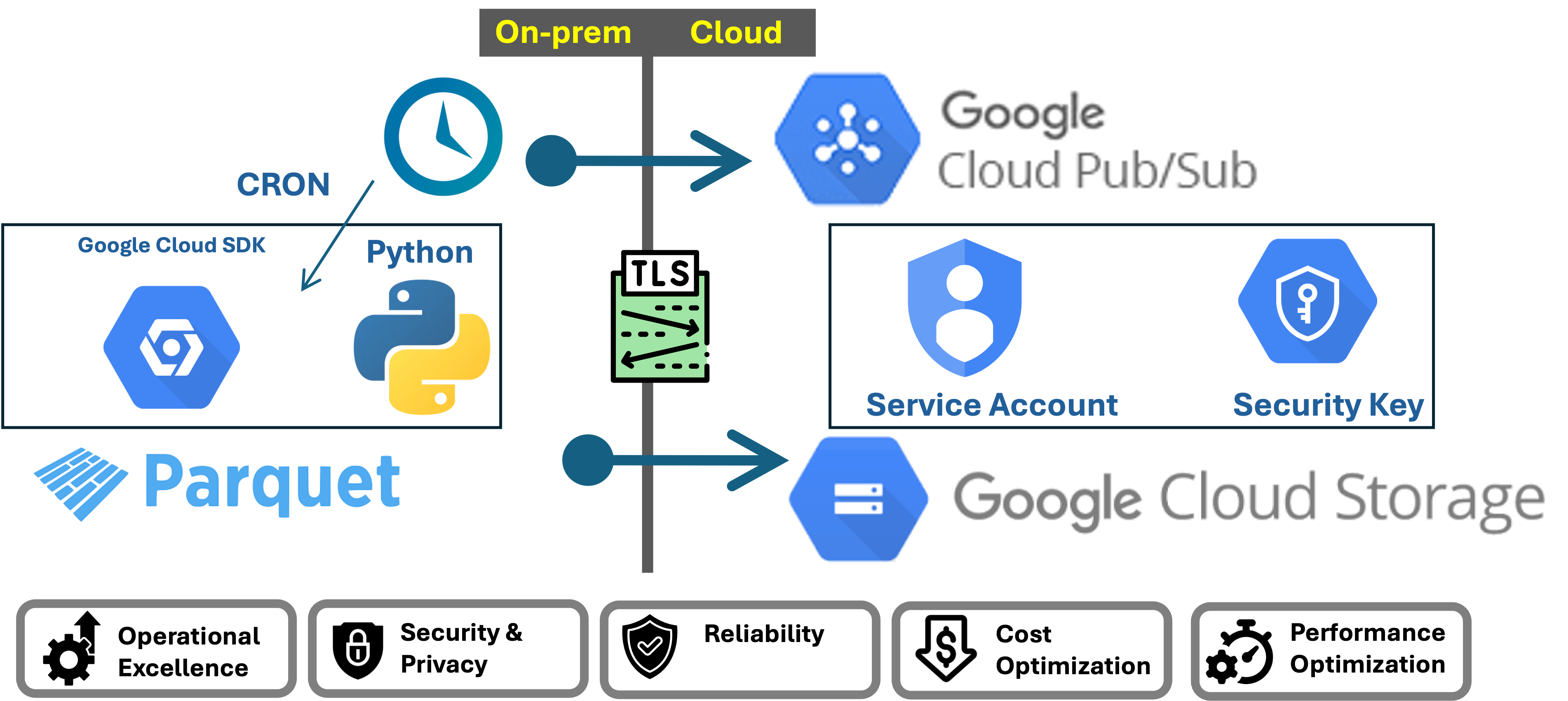
Table Formats Comparison Demo
Published:
Avro vs Parquet vs CSV Demo
Published:
Column Transformations for Staging
Published:
ConversationAI: Importing Documents
Published:
Iceberg Setup with Spark ETL and Nessie Catalog - Part 2
Lakehouse, Iceberg, Spark, 2024
Iceberg Setup with Spark ETL and Nessie Catalog - Part 1
Lakehouse, Iceberg, Spark, 2024
MinIO Object Storage for Linux Locally (anywhere)
Lakehouse, Minio, 2024
When I play with new technologies, I like to plat it on my machine locally. Minio is a perfect simulation of cloud storage locally. You can deploy it locally and interact it like a S3 object storage.
Iceberg on AWS: Part 2 - Glue 4 Loves Iceberg
Lakehouse, Glue, 2024
Iceberg on AWS: Part 1 - Hello World
Lakehouse, Iceberg, 2024
Local Development: AWS Lambda deployed in Docker with DynamoDB in NoSQLWorkbench
Application Service, AWS, 2024
Install DynamoDB locally
The installables can be found at the aws wbesite:https://docs.aws.amazon.com/amazondynamodb/latest/developerguide/DynamoDBLocal.DownloadingAndRunning.html
Apache Airflow: AWS Managed (MWAA) - Snowflake
Lakehouse, Airflow, 2024
Data Processing with DBT and Snowflake
Data Warehouse, Snowflake, 2024
ETL Data Test and Validate
Data Warehouse, Snowflake, 2024
Setup
Installed DBT Core locally. The install configuration can be described by the command: dbt debug
Installed DBT Utils
DataFlow: Source Storage, Transform and Sink Biquery
Data Processing, GCP, 2024
Manage Data Quality With Great Expectations
Data Quality, Snowflake, 2024
Apache Beam Model. Clean and Simple
Data Processing, Beam, 2024
Apache Beam Using Pardo in DataFlow
Data Processing, Beam, 2024
Hive on EMR Serverless
DataLake, Glue, 2024
Infrastructure as Code - Terraform for Azure
Infrastructure, Azure, 2024
Collect: Airbyte Extract And Load to both S3 and Snowflake
Lakehouse, Airflow, 2024
Snowflake: AWS S3 Loading
Datawarehouse, S3, 2024
On-Prem gcloud SDK - Cloud Storage & Pub/Sub
gcloudSDK, GCP, 2024
Building Reliability in On-prem Data Upload Jobs Through Log Monitoring
Monitoring, GCP, 2024
GCP DialogFlowCX: Setup, Flow, Intent, Entities and Parameters
AI/ML, DialogflowCX, 2024
GCP DialogFlowCX Data store LLM generated agent responses based Knowledgebase in Storage.
AI/ML, DialogflowCX, 2024
AWS Lake Formation.
Data Lake, LakeFormation, 2025
AWS Lake Formation = Scaled Data Lake + Scaled Security Provisioning
Snowflake: AWS S3 Loading 22222222222
Datawarehouse, S3, 2026
I had used the Template SQL Worksheet provided by Snowflake with an end to end process to load data from Amazon S3 which I play around with. It worked like a champ. Also used the Snowflake documentation.
Setup
/*--
Helpful Snowflake Documentation:
1. Bulk Loading from Amazon S3 - https://docs.snowflake.com/en/user-guide/data-load-s3
2. https://docs.snowflake.com/en/sql-reference/functions/system_validate_storage_integration
-*/
-------------------------------------------------------------------------------------------
-- Step 1: To start, let's set the Role and Warehouse context
-- USE ROLE: https://docs.snowflake.com/en/sql-reference/sql/use-role
-- USE WAREHOUSE: https://docs.snowflake.com/en/sql-reference/sql/use-warehouse
-------------------------------------------------------------------------------------------
--> To run a single query, place your cursor in the query editor and select the Run button (⌘-Return).
--> To run the entire worksheet, select 'Run All' from the dropdown next to the Run button (⌘-Shift-Return).
---> set Role Context
USE ROLE accountadmin;
---> set Warehouse Context
USE WAREHOUSE compute_wh;
-------------------------------------------------------------------------------------------
-- Step 2: Create Database
-- CREATE DATABASE: https://docs.snowflake.com/en/sql-reference/sql/create-database
-------------------------------------------------------------------------------------------
---> create the Database
CREATE OR REPLACE DATABASE db_prestage;
-------------------------------------------------------------------------------------------
-- Step 3: Create Schema
-- CREATE SCHEMA: https://docs.snowflake.com/en/sql-reference/sql/create-schema
-------------------------------------------------------------------------------------------
---> create the Schema
CREATE SCHEMA IF NOT EXISTS db_prestage.ERP
COMMENT = 'Loading data from S3' ;
-------------------------------------------------------------------------------------------
-- Step 4: Create Table
-- CREATE TABLE: https://docs.snowflake.com/en/sql-reference/sql/create-table
-------------------------------------------------------------------------------------------
---> create the Table
CREATE TABLE IF NOT EXISTS db_prestage.ERP.business_partners
(
PARTNERID INTEGER,
PARTNERROLE INTEGER,
EMAILADDRESS varchar,
PHONENUMBER INTEGER,
FAXNUMBER varchar,
WEBADDRESS varchar,
ADDRESSID INTEGER,
COMPANYNAME varchar,
LEGALFORM varchar,
CREATEDBY INTEGER,
CREATEDAT INTEGER,
CHANGEDBY INTEGER,
CHANGEDAT INTEGER,
CURRENCY varchar
--> supported types: https://docs.snowflake.com/en/sql-reference/intro-summary-data-types.html
)
COMMENT = 'Creating a table';
---> query the empty Table
SELECT * FROM db_prestage.ERP.business_partners;
Follow the instructions which was strainght forward. This was the IAM JSON policy which I had created and worked for me.
"Version": "2012-10-17",
"Statement": [
{
"Effect": "Allow",
"Action": [
"s3:PutObject",
"s3:GetObject",
"s3:GetObjectVersion",
"s3:DeleteObject",
"s3:DeleteObjectVersion"
],
"Resource": "arn:aws:s3:::com-kfn-landing-s3storage-play-erp/erp/*"
},
{
"Effect": "Allow",
"Action": [
"s3:ListBucket",
"s3:GetBucketLocation"
],
"Resource": "arn:aws:s3:::com-kfn-landing-s3storage-play-erp",
"Condition": {
"StringLike": {
"s3:prefix": [
"erp/*"
]
}
}
}
]
}
Create a Snowflake Integration
-------------------------------------------------------------------------------------------
-- Step 5: Create Storage Integrations
-- CREATE STORAGE INTEGRATION: https://docs.snowflake.com/en/sql-reference/sql/create-storage-integration
-------------------------------------------------------------------------------------------
/*--
A Storage Integration is a Snowflake object that stores a generated identity and access management
(IAM) entity for your external cloud storage, along with an optional set of allowed or blocked storage locations
(Amazon S3, Google Cloud Storage, or Microsoft Azure).
--*/
---> Create the Amazon S3 Storage Integration
-- Configuring a Snowflake Storage Integration to Access Amazon S3: https://docs.snowflake.com/en/user-guide/data-load-s3-config-storage-integration
CREATE OR REPLACE STORAGE INTEGRATION kfn_s3_integration
TYPE = EXTERNAL_STAGE
STORAGE_PROVIDER = 'S3'
STORAGE_AWS_ROLE_ARN = 'arn:aws:iam::573981122510:role/SnowflakeS3ReadRole'
ENABLED = TRUE
STORAGE_ALLOWED_LOCATIONS = ('s3://com-kfn-landing-s3storage-play-erp/erp/' )
;
/*--
Execute the command below to retrieve the ARN and External ID for the AWS IAM user that was created automatically for your Snowflake account.
You’ll use these values to configure permissions for Snowflake in your AWS Management Console:
https://docs.snowflake.com/en/user-guide/data-load-s3-config-storage-integration#step-5-grant-the-iam-user-permissions-to-access-bucket-objects
--*/
DESCRIBE INTEGRATION kfn_s3_integration;
SHOW STORAGE INTEGRATIONS;
upload data into the bucket
Create a stage
-------------------------------------------------------------------------------------------
-- Step 6: Create Stage Objects
-------------------------------------------------------------------------------------------
/*--
A stage specifies where data files are stored (i.e. "staged") so that the data in the files
can be loaded into a table.
--*/
---> Create the Amazon S3 Stage
-- Creating an S3 Stage: https://docs.snowflake.com/en/user-guide/data-load-s3-create-stage
create stage kfn_s3_stage
storage_integration = kfn_s3_integration
url = 's3://com-kfn-landing-s3storage-play-erp/erp/'
;
---> View our Stages
-- SHOW STAGES: https://docs.snowflake.com/en/sql-reference/sql/show-stages
list @kfn_s3_stage;
Load Data
-------------------------------------------------------------------------------------------
-- Step 7: Load Data from Stages
-------------------------------------------------------------------------------------------
---> Load data from the Amazon S3 Stage into the Table
-- Copying Data from an S3 Stage: https://docs.snowflake.com/en/user-guide/data-load-s3-copy
-- COPY INTO <table>: https://docs.snowflake.com/en/sql-reference/sql/copy-into-table
COPY INTO db_prestage.ERP.business_partners
FROM @kfn_s3_stage
FILES = ( 'BusinessPartners.csv' )
file_format = (type = csv skip_header = 1 field_delimiter = ',');
-------------------------------------------------------------------------------------------
-- Step 8: Start querying your Data!
-------------------------------------------------------------------------------------------
---> Great job! You just successfully loaded data from your cloud provider into a Snowflake table
---> through an external stage. You can now start querying or analyzing the data.
SELECT * FROM db_prestage.ERP.business_partners;
Collect: Palantir: Ingest simple DB via UI
Palantir, Palantir, 2026
The objective is to build a fundemental ingest building block for ingest “Data Connection” in Palantir.
Some Prep work.
We need to host a DB (Postgres) and supabase.com to the rescue. I had used github cred to create a free account and load data into it.
loading the data into the table
Providing the sql statements to explain the data
-- Sample PLM database schema and seed data
-- Use case: Product lifecycle management with products, versions, components, change requests, and approvals.
-- Drop tables if they exist (adjust syntax for your RDBMS if needed)
DROP TABLE IF EXISTS approval_steps;
DROP TABLE IF EXISTS change_requests;
DROP TABLE IF EXISTS product_components;
DROP TABLE IF EXISTS product_versions;
DROP TABLE IF EXISTS products;
-- Product master table
CREATE TABLE products (
product_id INT PRIMARY KEY,
product_code VARCHAR(20) NOT NULL,
product_name VARCHAR(100) NOT NULL,
product_family VARCHAR(50),
lifecycle_stage VARCHAR(30) NOT NULL,
created_at DATE NOT NULL
);
-- Product version table representing released revisions
CREATE TABLE product_versions (
version_id INT PRIMARY KEY,
product_id INT NOT NULL,
version_label VARCHAR(20) NOT NULL,
release_date DATE,
status VARCHAR(30) NOT NULL,
description VARCHAR(200),
FOREIGN KEY (product_id) REFERENCES products(product_id)
);
-- Product component bill of materials
CREATE TABLE product_components (
component_id INT PRIMARY KEY,
version_id INT NOT NULL,
component_code VARCHAR(30) NOT NULL,
component_name VARCHAR(100) NOT NULL,
quantity INT NOT NULL,
supplier VARCHAR(100),
lifecycle_status VARCHAR(30) NOT NULL,
FOREIGN KEY (version_id) REFERENCES product_versions(version_id)
);
-- Change request table for product/version changes
CREATE TABLE change_requests (
request_id INT PRIMARY KEY,
product_id INT NOT NULL,
version_id INT,
request_type VARCHAR(50) NOT NULL,
request_title VARCHAR(150) NOT NULL,
requested_by VARCHAR(100) NOT NULL,
requested_date DATE NOT NULL,
target_release_date DATE,
request_status VARCHAR(30) NOT NULL,
priority VARCHAR(20) NOT NULL,
description TEXT,
FOREIGN KEY (product_id) REFERENCES products(product_id),
FOREIGN KEY (version_id) REFERENCES product_versions(version_id)
);
-- Approval workflow steps for change requests
CREATE TABLE approval_steps (
approval_id INT PRIMARY KEY,
request_id INT NOT NULL,
approver VARCHAR(100) NOT NULL,
step_order INT NOT NULL,
approval_status VARCHAR(30) NOT NULL,
decision_date DATE,
comments VARCHAR(250),
FOREIGN KEY (request_id) REFERENCES change_requests(request_id)
);
-- Seed data for products
INSERT INTO products (product_id, product_code, product_name, product_family, lifecycle_stage, created_at) VALUES
(1, 'PLM-1000', 'Smart Sensor Platform', 'IoT', 'Development', '2025-01-15'),
(2, 'PLM-2000', 'Industrial Gateway', 'Edge Systems', 'Release', '2024-08-01'),
(3, 'PLM-3000', 'Mobile App Suite', 'Software', 'Maintenance', '2023-11-20'),
(4, 'PLM-4000', 'Smart Factory Controller', 'Automation', 'Release', '2024-05-08'),
(5, 'PLM-5000', 'AR Maintenance Assistant', 'AR/VR', 'Concept', '2025-02-12');
-- Seed data for product versions
INSERT INTO product_versions (version_id, product_id, version_label, release_date, status, description) VALUES
(101, 1, 'v0.9', NULL, 'Prototype', 'Initial prototype for internal testing'),
(102, 1, 'v1.0', '2025-06-10', 'Planned', 'First commercial release planned'),
(103, 1, 'v1.1', '2025-09-30', 'Planned', 'Hardware and firmware release for next iteration'),
(201, 2, 'v1.0', '2024-11-12', 'Released', 'Initial production release'),
(202, 2, 'v1.1', '2025-03-05', 'Released', 'Minor update with stability fixes'),
(203, 2, 'v2.0', '2025-09-10', 'Planned', 'Major gateway update with new protocol support'),
(301, 3, 'v2.0', '2025-02-18', 'Released', 'Major mobile app update'),
(302, 3, 'v2.1', '2025-07-22', 'Released', 'Maintenance release with UX improvements'),
(401, 4, 'v1.0', '2024-10-01', 'Released', 'Initial factory controller release'),
(501, 5, 'alpha', '2025-12-01', 'Concept', 'Alpha release for AR maintenance assistant');
-- Seed data for product components
INSERT INTO product_components (component_id, version_id, component_code, component_name, quantity, supplier, lifecycle_status) VALUES
(1001, 101, 'SSP-MCU', 'Microcontroller Unit', 1, 'CoreChip Ltd', 'Approved'),
(1002, 101, 'SSP-SENSOR', 'Multi-sensor Array', 1, 'SenseMakers Inc', 'Approved'),
(1003, 101, 'SSP-HOUS', 'Enclosure', 1, 'PlasticWorks', 'Approved'),
(1004, 102, 'SSP-BATT', 'Rechargeable Battery', 1, 'PowerCell Co', 'Under Review'),
(1010, 102, 'SSP-FIRM', 'Firmware Package', 1, 'In-house', 'Under Review'),
(1011, 103, 'SSP-CASE', 'Rugged Enclosure', 1, 'ArmorPack', 'Proposed'),
(1005, 201, 'IGW-CPU', 'Gateway CPU Board', 1, 'EdgeLogic', 'Approved'),
(1006, 201, 'IGW-ANT', 'Antenna Assembly', 2, 'SignalWave', 'Approved'),
(1007, 202, 'IGW-GBL', 'Gateway Bluetooth Module', 1, 'BlueLink', 'Approved'),
(1012, 203, 'IGW-SEC', 'Security Module', 1, 'SafeNet', 'Approved'),
(1013, 203, 'IGW-PSU', 'Power Supply', 1, 'VoltPower', 'Approved'),
(1008, 301, 'APP-UI', 'Mobile App UI Module', 1, 'In-house', 'Approved'),
(1009, 301, 'APP-BACK', 'Backend Sync Service', 1, 'In-house', 'Approved'),
(1014, 302, 'APP-ANALYTICS', 'Analytics Engine', 1, 'In-house', 'Approved'),
(1015, 401, 'SFC-CPU', 'Controller CPU Board', 1, 'EdgeLogic', 'Approved'),
(1016, 401, 'SFC-IO', 'I/O Expansion Module', 4, 'ConnectCorp', 'Approved'),
(1017, 501, 'ARA-HMD', 'AR Headset', 1, 'VisionTech', 'Proposed'),
(1018, 501, 'ARA-SW', 'AR Software Core', 1, 'In-house', 'Proposed');
-- Seed data for change requests
INSERT INTO change_requests (request_id, product_id, version_id, request_type, request_title, requested_by, requested_date, target_release_date, request_status, priority, description) VALUES
(5001, 1, 102, 'Engineering Change', 'Update battery specification for longer runtime', 'Avery Johnson', '2025-03-25', '2025-05-20', 'Submitted', 'High', 'Switch to new battery supplier and update BOM documentation.'),
(5002, 2, 202, 'Quality Improvement', 'Replace antenna assembly with higher-gain unit', 'Mia Patel', '2025-01-10', '2025-02-28', 'Approved', 'Medium', 'Improves connectivity in remote installations.'),
(5003, 3, 301, 'Software Patch', 'Bug fix for data sync timeout', 'Noah Kim', '2025-04-02', '2025-04-30', 'In Review', 'High', 'Resolve intermittent timeouts for sync service on slow networks.'),
(5004, 1, NULL, 'New Feature', 'Add predictive maintenance analytics', 'Elena Rossi', '2025-04-18', '2025-08-01', 'Draft', 'Low', 'Introduce analytics dashboard in future release.'),
(5005, 4, 401, 'Regulatory Change', 'Update controller safety compliance labels', 'Priya Singh', '2025-01-20', '2025-04-15', 'Approved', 'High', 'Ensure factory controller meets latest CE and UL requirements.'),
(5006, 5, 501, 'Design Review', 'Refine AR overlay interaction flow', 'Jackson Lee', '2025-05-05', '2025-06-30', 'Submitted', 'Medium', 'Improve ease-of-use for maintenance technicians.'),
(5007, 2, 203, 'Engineering Change', 'Add secure boot support', 'Lena Chen', '2025-03-12', '2025-08-01', 'In Review', 'High', 'Required for new customer security standard.'),
(5008, 3, 302, 'Maintenance', 'Fix login crash on older OS versions', 'Amir Hassan', '2025-06-05', '2025-07-10', 'Approved', 'High', 'Critical bug affecting field technicians.'),
(5009, 1, 103, 'Engineering Change', 'Add edge analytics sensor calibration', 'Avery Johnson', '2025-05-01', '2025-09-15', 'Draft', 'Medium', 'Calibration logic for next version sensors.');
-- Seed data for approval steps
INSERT INTO approval_steps (approval_id, request_id, approver, step_order, approval_status, decision_date, comments) VALUES
(9001, 5001, 'Product Manager', 1, 'Approved', '2025-04-02', 'Battery life improvement is essential for launch.'),
(9002, 5001, 'Engineering Lead', 2, 'Pending', NULL, NULL),
(9003, 5002, 'Quality Director', 1, 'Approved', '2025-01-18', 'Antenna update meets customer needs.'),
(9004, 5003, 'Software Architect', 1, 'In Review', NULL, 'Need full regression test results.'),
(9005, 5004, 'Product Strategy', 1, 'Draft', NULL, 'Concept request under evaluation.'),
(9006, 5002, 'Engineering Lead', 2, 'Approved', '2025-01-25', 'Engineering has validated the antenna design.'),
(9007, 5003, 'QA Team', 2, 'Pending', NULL, 'Regression tests still running.'),
(9008, 5005, 'Compliance Lead', 1, 'Approved', '2025-02-02', 'Labels and documentation approved.'),
(9009, 5006, 'UX Lead', 1, 'In Review', NULL, 'Reviewing overlay behavior.'),
(9010, 5007, 'Security Director', 1, 'In Review', NULL, 'Secure boot implementation details needed.'),
(9011, 5008, 'Maintenance Manager', 1, 'Approved', '2025-06-20', 'Bug fix ready for deployment.'),
(9012, 5009, 'Engineering Lead', 1, 'Draft', NULL, 'Need BOM impact assessment.');
Data Connection
this will be a one time connection configuration and we will use this later in a transform.
Connection Details
Note: Ensure the egress network policies are appropriately added. [Typically managed by the platform admins]
Test Run
Configure a sync and a target and we are good to go.
The output folder which was configured had the data ingested.
Palantir Simple Injest from Postgress
Palantir, Palantir, 2026
Some intitial thoughts
- We will Use Python (Lightweight) for most ingestion use cases. It’s simpler, faster to start up (no Spark overhead), and handles the vast majority of table sizes. This is what we will be building now with @external_systems + psycopg2.
- Use will PySpark only when you need Spark’s distributed JDBC reader to parallelize reads across partitions for very large tables. Spark can split a single table read into multiple parallel queries using a partition column: We will try an demonstrate how we would achieve this in a later use case
We developed how to create a data connection
Code Repository
Code Repository in Foundry
A Code Repository is a Git-backed project that contains the logic for data transformations, functions, models, or applications. It’s the fundamental unit where all “code” lives in Foundry.
What It Contains
code-repository/ ├── transforms-python/ │ ├── conda_recipe/ │ │ └── meta.yaml ← Dependencies (packages) │ └── src/ │ ├── myproject/ │ │ ├── pipeline.py ← Registers transforms for discovery │ │ └── datasets/ │ │ └── my_transform.py ← Your transform logic │ ├── setup.py ← Entry point declaration │ └── test/ ← Unit tests ├── build.gradle ← Build configuration └── ci.yml ← CI pipeline definition
Give at a name and a folder where it needs to reside. Use the option to open via VSCode and now we are ready to go. They provide an option to use a template.
Since I am starting out, using the template option.
Before we get into design, there is something which did escape me and create some confusion is below
Registration and Runtime Layer
┌─────────────────────────────────────────────────┐
│ REGISTRATION LAYER (static, fixed at check-in) │
│ → Input(), Output(), Source() │
├─────────────────────────────────────────────────┤
│ RUNTIME LAYER (configurable per build) │
│ → StringParam(), IntegerParam(), BooleanParam() │
└─────────────────────────────────────────────────┘
1. Output() — Where data goes
What it is: Declares the dataset that your transform will write to.
How to use it:
output = Output("/my-project/data/clean-customers")
Limitations:
- Must be a fixed path or RID — cannot be dynamic
- One transform can have multiple outputs, but each must be declared explicitly
- The path is resolved when the code is registered (checked in), not at build time
2. Input() — Where data comes from
What it is: Declares a Foundry dataset that your transform reads as input.
How to use it:
db_config = Input("ri.foundry.main.dataset.ec675cfe-c4ac-4b43-b238-2528be816ce3")
# or
raw_data = Input("/my-project/data/raw-customers")
Limitations:
- Must be a fixed path or RID — cannot be dynamic
- Foundry uses this to build the dependency graph (knows what to build first)
- Cannot read from a dataset that isn’t declared as an Input
3. Source() / @external_systems — Connection to the outside world
What it is: Declares a connection to an external system (database, API, cloud storage) configured in Data Connection.
How to use it:
@external_systems(postgresql_dc=Source("ri.magritte..source.312ffc80-xxxx"))
Limitations:
- Must be a fixed source RID — cannot be dynamic
- The source must already exist in Data Connection
- Security and network egress policies are tied to the source at registration
- You still need to write the query/fetch logic inside the function
4. StringParam(), IntegerParam(), BooleanParam() — Runtime configuration
What they are: Configurable values that can be changed per build without modifying code. How to use them:
filter_column = StringParam("customer_name") # default: "customer_name"
min_records = IntegerParam(100) # default: 100
include_nulls = BooleanParam(False) # default: False
What they’re good for:
- Controlling filter logic, thresholds, feature flags
- Changing table names or queries sent to an external system
- Toggling behavior without a code change
Limitations:
- Can only be used inside the transform function (runtime logic)
- Cannot be used to set Input(), Output(), or Source() paths
- Values are set at build time (via UI or schedule configuration)
- Types are limited to: String, Integer, Boolean
Design
Now lets get to the design
I would like this to scale to mutiple tables and eventually multiple databases. First we will try multiple tables and then pivot
┌─────────────────────────────┐
│ Data Connection Source │ ← PASSWORD
└─────────────────────────────┘
┌─────────────────────────────┐
│ Config Dataset (Foundry) │ ← host, port, username, database (not in Git)
└─────────────────────────────┘
┌─────────────────────────────┐
│ Code Repository (internal) │ ← Only logic + table_config.json
└─────────────────────────────┘
I chose to separate my PostgreSQL ingestion pipeline into three layers because I need to promote this to production, and I don’t want sensitive infrastructure details leaking into Git.
Why I’m using a Data Connection Source for credentials
I store my PostgreSQL username and password in Foundry’s Data Connection Source because it’s the platform’s built-in secret store. Foundry encrypts these values, controls who can access them, and provides audit logging. When my transform runs, it calls get_secret(“PASSWORD”) at runtime — the actual credential never appears in my code or Git history. If I rotate my database password, I update it once in the source and all my transforms pick it up automatically without a code change.
Note: Since I am using my own code to connect, need to intall psycopg2. We mention this inside meta-yaml
also to execute the testing in the vscode we need to install the same
maestro env conda install psycopg2
Why I’m using a config dataset for connection details
I don’t want my database hostname, port, or database name in Git either. Even though these aren’t secrets in the traditional sense, they reveal my infrastructure — where my database lives, what cloud provider I use, what port it’s on. That’s information I’d rather not have in version control. By storing it in a Foundry dataset, I can:
- Control who sees it with dataset-level permissions
- Change it without a code commit (e.g., if my Supabase instance migrates)
- Have different config datasets per environment (dev, staging, prod) without branching my code
Why I’m using a JSON config file for table mappings
My table_config.json lists which PostgreSQL tables to ingest and where each one lands in Foundry. This IS something I want in Git because:
- It’s not sensitive — table names like public.customers don’t expose anything
- I want it reviewed in PRs when someone adds a new table
- I want Git history showing when and why a table was added or removed
- When I promote to production, the table mappings are part of my deployment — they should travel with the code
Why this works for production promotion
When I move from dev to prod, I:
- Don’t touch the code — the Python logic is environment-agnostic
- Create a new source in prod — with prod credentials, same get_secret() calls work
- Create a new config dataset in prod — with the prod hostname/port
- Deploy the same repo — only update the source RID and config dataset path
- Nothing is hardcoded. Nothing sensitive is in Git. Every piece of configuration is managed through Foundry’s governed, auditable services.